Google and Bing are always looking for the best sites to serve on their Search Engine Results Pages (SERPs), and a part of that is User Experience (UX).
Most of us would agree, that the most important part of user experience is in fact the load speed. After all, if a web page does not load, then the user experience after that is absolutely pointless.
With this in mind, we should focus our attention to improving a web page load speed as a part of our technical SEO (Search Engine Optimisation).
Website Load Speed Composition
A website is build on blocks, a little like lego, and each element needs to be taken care of to make a site as fast as it can be. If you run your website through the speed test site gtmetrix.com, and point the server to the nearest one (we use London) then you will see results like this:
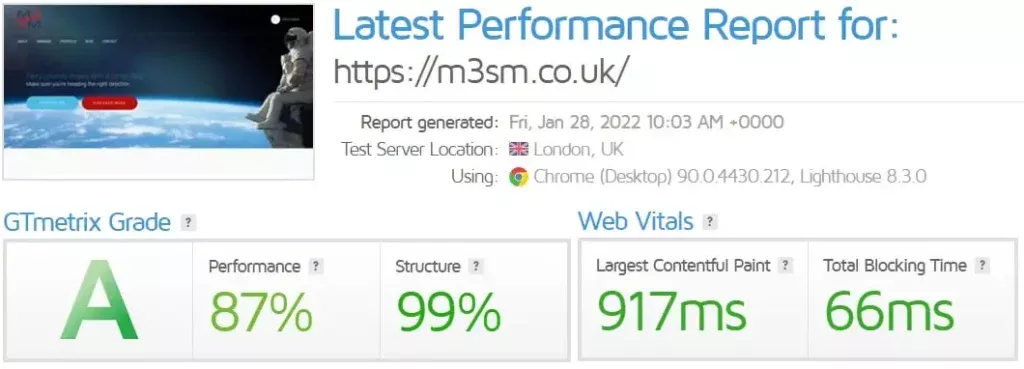
Well, hopefully you will, often it is the case that your results are not so good, and then you need to consider making a few changes to speed up your website.
Let’s remember these building blocks:

What do they mean?
- First Contentful Paint – How quickly content like text or images are painted onto your page. A good user experience is 0.9s or less.
- Speed Index – How quickly the contents of your page are visibly populated. A good user experience is 1.3s or less.
- Largest Contentful Paint – How long it takes for the largest element of content (e.g. a hero image) to be painted on your page. A good user experience is 1.2s or less.
- Time to Interactive – How long it takes for your page to become fully interactive. A good user experience is 2.5s or less.
- Total Blocking Time – How much time is blocked by scripts during your page loading process. A good user experience is 150ms or less.
Each of these blocks are made of different elements that can be enhanced and improved, and in most cases you may need the assistance of a web developer. However, if you are strapped for cash, or have the resource in-house, then there are a few really simple fixes you can do for quick wins and speedy results. Always remember caching may mean results are not seen for a day or two.
Quick Fixes
Do you want a faster website? Then you should care about WebP. It makes websites lighter and makes them faster. WebP combines the feature of PNG and JPEG. It is the new king of the image format.
how long they take to load.
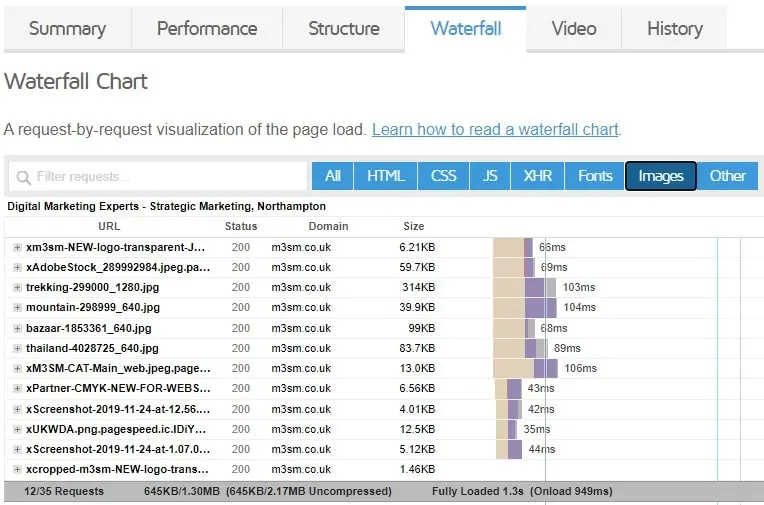
The images that are slow will generally be .jpg or .png format.
You should take the following steps to make improvements:
- Download the offending image
- Use either compressjpg.com or compresspng.com to compress the image
- Put the compressed image into convertio.co in order to then change your image from .jpg or .png into .webp format.
- Re-upload your image and save.
Doing this across your largest images (especially ones in the header or footer, which will affect all pages on your website) should reveal an improvement in speed when you re-test the following day.
Enjoy the benefits of a faster site, and please do not hesitate to contact us if you need any further help or advice.


