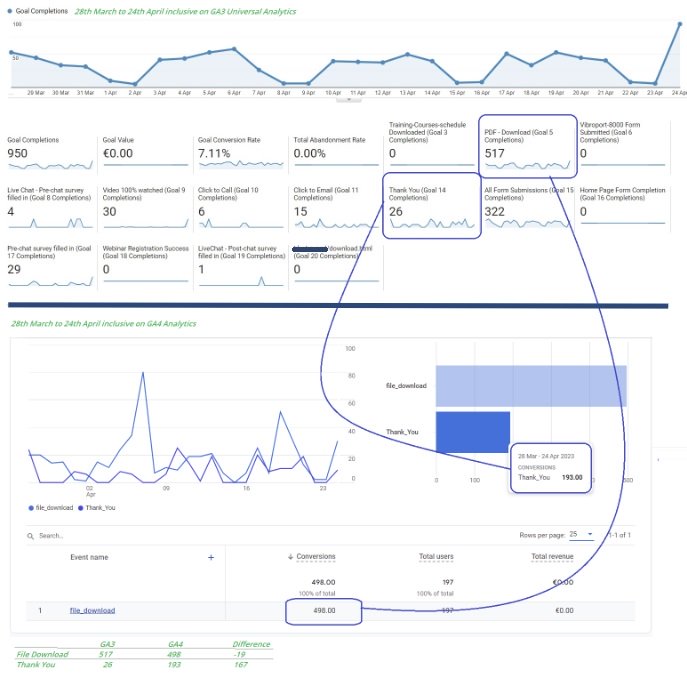
GA4 vs GA3: When you are looking at GA4, and you compare the data with GA3, are you finding that the data in each do not match?
Are you scratching your head to try to find the “missing data”, trying to sort a resolution? We hope this article will help you in your search for GA4 perfection.
Life After GA3:
On 1 July 2023, Universal Google Analytics (GA3) will stop processing data.
Starting in March 2023, for continued website measurement, you should have created a new Google Analytics 4 (GA4) property, or one will have been created for you (by Google’s’ automated system) based on your original property and reusing existing site tags.
However your GA4 was created, ensure data is being tracked correctly, and for the maximum term possible.
Introduction:
GA4 – The new analytics dashboard, offering a way to track events and interactions on a website, app or server.
GA4 vs GA3 Comparison:
GA3 uses a measurement model which is based on sessions and pageviews. Whereas GA4 uses the measurement model based on events and parameters.
One of the major benefits of GA4 is that you can use predictive metrics. These metrics are derived from machine learning algorithms that measure conversion progress.
GA4 Key Benefits:
- GA4 uses the measurement model based on ‘events and parameters’, which is more flexible and superior to the ‘sessions and pageviews’ based model used by GA3.
- GA4 means that you can use it for your website or mobile app, as well as both website and mobile app together.
- GA4 roll-up reporting (360 plans only) is much more accurate than the one provided by GA3, as both mobile apps and websites use the same schema for tracking users’ activities.
- GA4 provides much more accurate cross-device and cross-platform tracking than GA3.
- GA4 provides automatic tracking for certain types of events via enhanced measurement.
- GA4 makes event tracking setup much easier than GA3 as you are no longer tied to the ‘category-action-label-value’ schema.
- GA4 provides debugging within the reporting interface.
- GA4 reporting view provides a new set of engagement metrics that can much more accurately track users’ engagement with your website/app than the pageviews and bounce rate metrics used by GA3.
- Being a Google product, GA4 natively integrates with other Google products like Google Ads, Search Console and BigQuery.
- GA4 provides Exploration report templates through which you can do advanced data analysis.
- GA4 makes conversion tracking much easier, as you can easily mark any logged event as a conversion.
- GA4 is free to use.
Make a Change:
One important thing to do, is to check the client Data Retention period, in the Data Settings area of the Admin section in GA4.. The default is 2 months!
Change this to the maximum of 14 months and then on a monthly basis, add the important information to a Month-on-Month and Year-on-Year Spreadsheet for simple comparisons.
Attribution Models:
When you compare the same date range GA4 vs GA3, you will see a difference, and it is only when you look again at the detail that you can understand why this may be happening.
GA3 will use Last Click Attribution Model as standard, whereas GA4 uses the new Cross Channel Attribution Model.
On January 26th, 2022, Google will be switched all GA4 properties’ attribution settings to the data-driven attribution model. This was an upgrade to a machine learning-based model that now takes all interactions in a conversion path and calculates an attribution weight to each interaction based on the influence it has on a conversion path.
This update changed the default attribution model from Cross-channel last click to Data-driven attribution changing how conversion data is being reported.
-
- Data-Driven attribution allows for more in-depth conversion reporting.
There are three types of attribution models available in GA4 properties that can be updated at any time.
If users would not like to report using the new Data-Driven attribution model, they will need to go into the Attribution settings of their GA4 property and update to the attribution model of their choosing.
Cookies:
Yes, Cookies affect the data in GA4.
Behavioural modelling for consent mode uses machine learning to model the behaviour of users who decline analytics cookies based on the behaviour of similar users who accept analytics cookies. Modelled data allows you to gain useful insights from your Analytics reports while respecting your users’ privacy.
If you use GA4 with IP anonymization and do not share users’ data with other Google products, you do not need to receive explicit Cookie Consent. However, if you do not use IP anonymization or share GA4 data with Google Ads or Google Signals, then you need to obtain active users’ consent by providing a Cookie Banner… Let’s see how.
Change Cookies Default Settings:
You need the Editor role to use this feature. To override default cookie expiration and cookie update settings:
-
-
- In the Property column, click Data Streams > Web.
- Click the data stream for your website, then under Google tag, click Configure tag settings.
- Under Settings, click Show all.
- Click Override cookie settings.
- Select the Override default cookie settings checkbox.
- Under Cookie expiration select how long before cookies expire (from immediately to 25 months).
- Under Cookie update select either Set cookie expiration time relative to most recent visit or Set cookie expiration time relative to first visit.
- Click Save.
Events:
We use GA4 events to determine where drop offs are on the website, and also to determine revenue or sales leads.
Some are prebuilt, others are defined by M3SM for the client, via Google Tag Manager (GTM). This information is useful in determining UX improvements.
Reports:
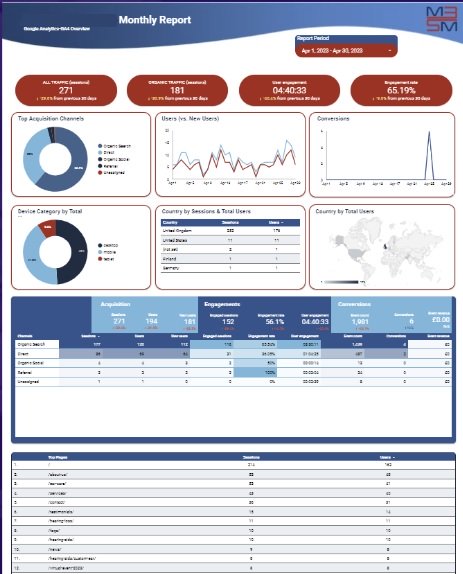
Some software, such as Raven Reporting, have not yet connected the developers API to incorporate the new GA4 data.
Therefore, M3 have made the decision to move to Looker from July 2023 for reporting. This means you can pull off reports at any time for any date range you choose simply by amending the date picker top right on your reports.