Improving On-Page SEO is one of multiple key factors to increase targeted traffic to your webpage. WordPress Plugins such as Yoast allows you to enhance your websites ranking on search results; utilising key words, a Meta Description and a Meta Title, all will help grow your page within Google’s ranking system. You should know that Google looks at around 200 different elements to determine where you are placed within the Search Engine Results Pages (SERPs), and Meta information is a very small part.
Why is On-Page SEO so vital?
On-Page SEO allows Google to understand your webpage, making sure they display the correct page to the relevant search result. Google is always updating and changing their algorithm to better identify the best webpages for the person who is searching, making sure the user is being shown up-to-date relevant information.
Over half of all website traffic comes through Organic search results through search engines like Bing and Google. Making sure you have optimised your pages will always create a positive effect that will help increase traffic.
If You Don’t – Your Competitors Will!
It is vital to make sure that you are updating your website with relevant content that has up-to-date information that your website visitor will find useful. Your visitor is on your website because they are looking for something. Almost all searches are a question, even the searches such as “Massage Northampton” is a question … “Where can I find a Massage Therapist in Northampton?” or “Shutter Blinds Cheshire” … “Where can I buy shutter blinds in Cheshire?”
Adding FAQs within your content often helps with answering some of those searched questions. But make it specific to the page. If your website offers Acoustic Design for example, and you write about walking your dog, as much as that may be interesting, it is not relevant to the page and will result in a lower placement in the Search Engine results Pages (SERPs) and a lower conversion rate once your webpage is found.
You should always remember, that whilst you are optimising your web pages, so are your competitors, which means you have to keep on looking to improve. Writing new content is a great start.
Imagine if you wrote one blog a month. Over the period of a year, that’s an additional 12 blogs, which means 12 more pages that the searches engines can find and potentially show you within the search results. So, if you and also your business colleague both wrote one blog a month, that’s an additional 24 blogs, therefore 24 more additional opportunities to be found. You get the idea. Plus, each team member will have different strengths to talk about when they write, meaning the topics are more varied than if just one person created them.
What to consider
When creating content, you always have to consider the below elements for your On-Page SEO:
- Keyphrase – Choose wisely!
- Meta Title
- Meta Description
- H1, H2, H3
- Text Length greater than 300 words (optimum is around 2000)
- Internal Links
- Alt Text
Keyphrase – Your Keyphrase needs to be the focus of the blog; placed in the title, the first paragraph, and a few times in the content. This Keyphrase ties into your SEO Title and your Meta Description, you can see how important this is! Your Keyphrase has to be relevant to your content, and fairly unique to that page, otherwise which page will Google choose to show?
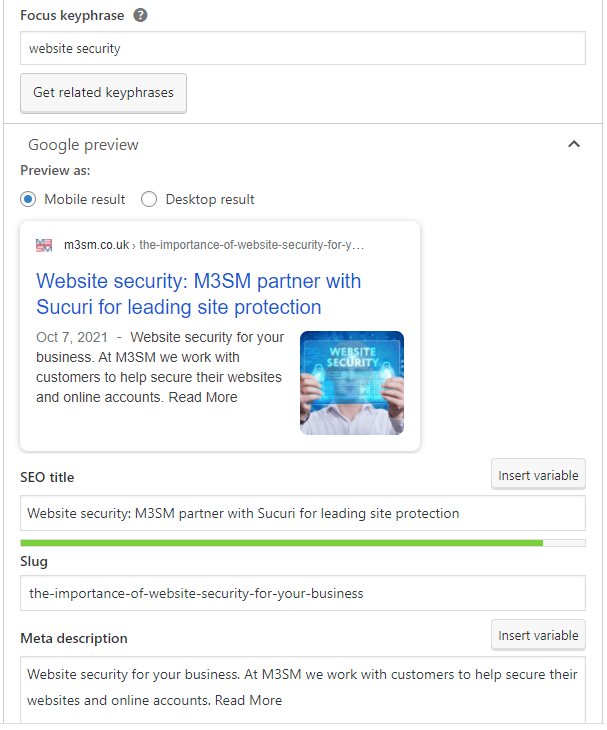
Meta Title – this key piece of information is what your searcher sees in the Search Engine Results – this is the title of your Organic listing.

Meta Description – You can see from the image above that the Meta Description appears within Googles search listings immediately underneath the Meta Title. getting the Meta Information is key to attracting visitors to your website, this is your chance to say “hey, I can offer you what you are looking for, come and read more on our website now!”
H1, H2, H3 Tags – these are often used by website developers to ensure that headings on your web page are consistent throughout your website. However, Google uses it to understand and prioritise content. it expects to see a unique H1, H2 and H3 tag on every page. Additionally, there should only be 1 x H1 tag on your page, and this needs to be a precursor to relevant content and above the H2 tag, which is above the H3 tag etc.
Text Length – Google does not like web pages with less than 300 words, as it cannot understand the meaning and context of the page with a short paragraph. It needs more, and the more the better. However, your reader has to be able to understand the content and so adding images and bullet points is important for skim readers. Also use bold to highlight things that could be of interest and are very useful for the reader. Afterall, at this point you are looking to engage with the reader, not Google!
Internal Links – Prioritise pages and make them easy for Google to find by using Internal Links. By that we mean link from one page to another, using the keyphrase that you are optimising that other page for. As an example, if you look at the image we used that shows we are optimising a page for the keyphrase “Website Security” and we have linked to that page from the keyphrase like this: Website Security.
Website Security– This is the process of labelling images. Simply put, Google is blind and cannot see your images, so goes by the description, which should be short, succinct and an accurate description of the image.
Talking of images
Images need to be as small in weight as possible. One of the things the Search Engines look for is site speed, and images, if they are heavy, can weigh down your site. If possible use WebP format, but AFTER you have compressed them. If you cannot use WebP on your website, then the minimal you should do with an image is to compress it.
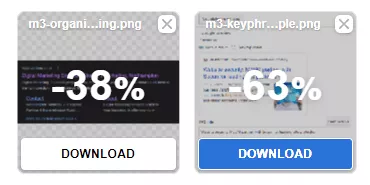
Using a tool such as https://compresspng.com/ (for .png images) or https://compressjpg.com/ (for .jpg images) may reduce the size of the image with little impact to the quality and these easy to use compression tools are also free to use!
If your site can use WebP format, then hop across to https://convertio.co/ to change your already compressed image to a WebP format. Don’t forget the Alt Tag.
There is so much more you can do to improve the online visibility of your web pages, and if you need any help or advice, please do not hesitate to make contact. We look forward to hearing from you.


